XSL stand for eXtensible Stylesheet Language and XSLT stands for XSL Transformations. XSL is a styling language for xml and XSLT is used to transform xml document into other format like text, csv or xml. Xslt is represented in a xml format and XSLT uses XPath to navigate in xml document.
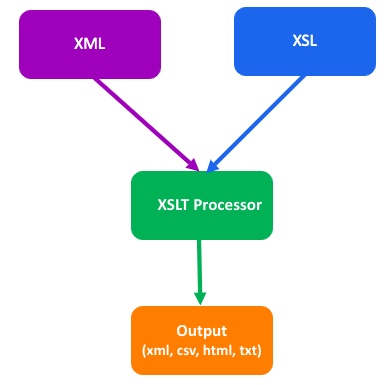
How XSLT works
XML source document and xsl gets passed to xslt processor, XSLT processor parse the xml document and apply templates to determine which data to be process from xml document and generate output file document.
Example
Transform report output to csv file format.
- File should have all employees
- File Delimiter , (comma)
- Header Details : Employee ID,Name,Manager ID,Manager Name
Report XML
<?xml version="1.0" encoding="UTF-8"?>
<wd:Report_Data xmlns:wd="urn:com.workday.report/INHCM0001-Outbound">
    <wd:Report_Entry>
        <wd:Employee_ID>123455</wd:Employee_ID>
        <wd:Legal_Name>Elis Stamp</wd:Legal_Name>
        <wd:Workers_Manager>
            <wd:Legal_Name>Jasper Howell</wd:Legal_Name>
            <wd:Manager_ID>222222</wd:Manager_ID>
        </wd:Workers_Manager>
    </wd:Report_Entry>
    <wd:Report_Entry>
        <wd:Employee_ID>123456</wd:Employee_ID>
        <wd:Legal_Name>John Deo</wd:Legal_Name>
        <wd:Workers_Manager>
            <wd:Legal_Name>Jasper Howell</wd:Legal_Name>
            <wd:Manager_ID>3333333</wd:Manager_ID>
        </wd:Workers_Manager>
    </wd:Report_Entry>
</wd:Report_Data>
Stylesheet
<?xml version="1.0" encoding="UTF-8" ?>
<xsl:transform xmlns:xsl="http://www.w3.org/1999/XSL/Transform" version="2.0"
xmlns:wd="urn:com.workday.report/INHCM0001-Outbound">
<xsl:output method="text" encoding="UTF-8" indent="no" />
<!-- Declare Global Variable: This variable will be accessable in all template -->
<!-- For new line feed you can use either 
 (hex) or 
 (dec) -->
<xsl:variable name="linefeed"><xsl:text>
</xsl:text></xsl:variable>
<!-- For carriage return you can use either 
 (hex) or 
 (dec) -->
<xsl:variable name="carriagereturn"><xsl:text>
</xsl:text></xsl:variable>
<!-- For carriage return + new line feed, you can user as below -->
<xsl:variable name="carriagereturnandlinefeed"><xsl:text>
</xsl:text></xsl:variable>
<!-- Change file delimeter type based on your requirement -->
<xsl:variable name="delimeter"><xsl:text>,</xsl:text></xsl:variable>
<xsl:template match="/wd:Report_Data">
<xsl:call-template name="header" />
<xsl:value-of select="$linefeed"/>
<xsl:apply-templates select="wd:Report_Entry"/>
</xsl:template>
<xsl:template name="header">
<!--
You can also write header in a single line, but it is not recommened as its hard to maintain also it will not be user friently to read
eg: <header>Employee ID,Name,Manager ID,Manager Name</header>
-->
<Employee_ID>Employee ID</Employee_ID>
<xsl:value-of select="$delimeter"/>
<Name>Name</Name>
<xsl:value-of select="$delimeter"/>
<Manager_ID>Manager ID</Manager_ID>
<xsl:value-of select="$delimeter"/>
<Manager_Name>Manager Name</Manager_Name>
</xsl:template>
<xsl:template match="wd:Report_Entry">
<!-- this template will get processed for once for each worker -->
<Employee_ID><xsl:value-of select="wd:Employee_ID"/></Employee_ID>
<xsl:value-of select="$delimeter"/>
<Name><xsl:value-of select="wd:Legal_Name"/></Name>
<xsl:value-of select="$delimeter"/>
<Manager_ID><xsl:value-of select="wd:Workers_Manager/wd:Manager_ID"/></Manager_ID>
<xsl:value-of select="$delimeter"/>
<Manager_Name><xsl:value-of select="wd:Workers_Manager/wd:Legal_Name"/></Manager_Name>
<xsl:value-of select="$linefeed"/>
</xsl:template>
</xsl:transform>
Output
Employee ID,Name,Manager ID,Manager Name
123455,Elis Stamp,222222,Jasper Howell
123456,John Deo,3333333,Jasper Howell
